Auto-zoom that follows your clicks
FreeRecoly zooms to the action as you click and glides between areas — and holds steady when you click around one spot. No keyframes.
Recoly records your Mac in up to 4K, then turns the raw take into polished video — automatic zoom, smooth cursor, clean backgrounds, captions and device mockups. No timeline wrangling.
Free forever for the essentials. Upgrade to Pro for 4K, no watermark and more.
Anyone can hit record.
Recoly makes it look produced.
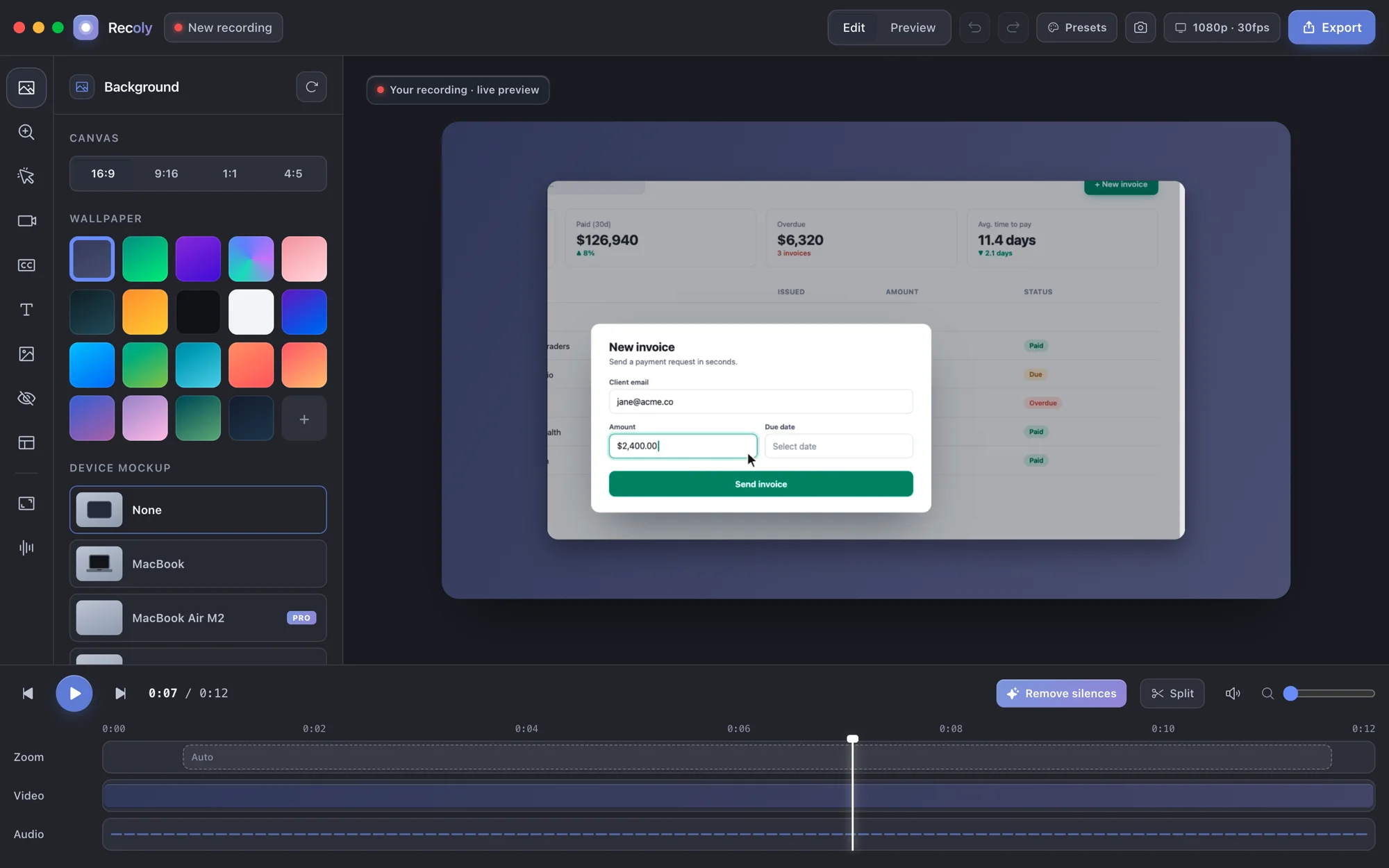
Record once and Recoly handles the polish — zoom, trims, captions and a clean export you can drop anywhere.
The moment that matters is turning that raw capture into something people actually want to watch.
Sales needs a crisp walkthrough by end of day — not a shaky, zoom-less screen grab.
A quick GIF says more than three paragraphs. You need it in seconds, not a video editor.
Students tune out blurry footage. Every click should be readable and captioned.
Recoly watches the cursor, zooms where the action is and lays the take on a clean background. Trim the dead air in one click, and the file you export already looks edited.
No cloud upload. No account. Your footage stays yours.
Recording, editing and export all happen on-device. Nothing is uploaded, nothing is tracked.
Capture, edit and export never leave your Mac.
Download and record. No sign-up, no email, no tracking.
Export MP4, WebM, GIF or ProRes — you own the output.
Transcription runs on-device with Whisper. No cloud.
Developer ID signed and notarized by Apple.
Buy Lifetime once. No subscription required.
The difference isn't the camera. It's the edit Recoly does for you.
Same screen, same moment — one is a plain grab, the other looks produced.

Record once. Recoly frames, zooms and polishes the video for you, with a full editor when you want control. Free covers the essentials; Pro adds the studio extras.
Recoly zooms to the action as you click and glides between areas — and holds steady when you click around one spot. No keyframes.
Pixelate, blur or cover emails, API keys and names. Masks stay locked to the content through every zoom and crop.
16:9 for YouTube, 9:16 for Reels and TikTok, 1:1 and 4:5 for posts — the layout adapts, nothing to rebuild.
Pick an area from any app, then copy it with ⌘C or save it with ⌘S. Retina-sharp, straight to your clipboard.
A screen, one window or any area — with mic, system audio and webcam.
Wallpapers, padding, rounded corners and shadows. Save your look as a preset and reuse it.
Choose its shape, size and corner. Pro removes the background — no green screen.
Switch to full camera, side by side or screen-only as you talk, with smooth transitions.
A clean MacBook frame for free; photo-real MacBook, iMac and Pro Display XDR with Pro.
Remove the silences from a long take in one click.
On-device transcription and styled captions for free. Pro translates them into 19 languages.
Add callouts, logos and click effects, smooth the cursor — or swap its style with Pro.
MP4 and GIF up to 1080p free, with a small watermark. Pro adds 4K, ProRes, WebM and no watermark.
Go live to YouTube, Twitch or any RTMP server with your Recoly layout.
Every edit is saved as you go. Close the app or crash — come back to exactly where you were.
Recording, captions and translation run on your Mac. No account, no uploads.
Recoly is a native macOS screen recorder and editor — a friendlier alternative to QuickTime, Loom and OBS for demos, tutorials and bug reports.
QuickTime records but barely edits. Loom lives in the cloud. Recoly does both — natively, and offline.
Most people start free and upgrade when they ship their first real video.
No credit card. No account. · Questions? We answer every email.
For polished, watermark-free video.
Everything you need to record and share.
For polished, watermark-free video.
Trouble installing? Read the install guide
Free for macOS. No account, no watermark on Pro, no cloud.